
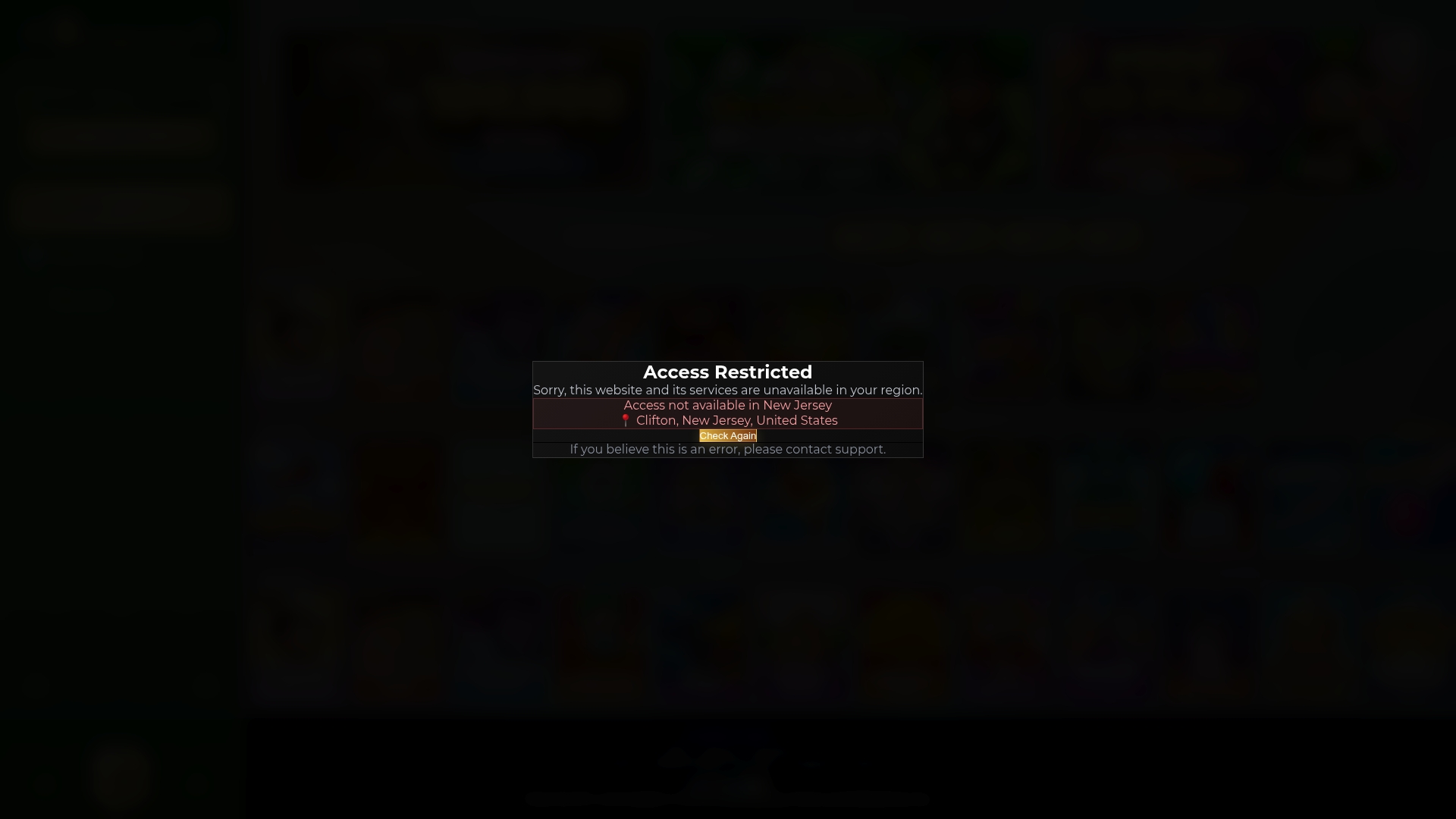
If Lucky Luxe is showing a geolocation error, the site's legal-play check can't verify your location. Start by disabling any VPN or proxy, turning on device location permissions, and switching to a trusted home network or mobile data. Do that before anything else. If you're physically located in a state where Lucky Luxe restricts sweepstakes play, none of these fixes will change the outcome.
TL;DR:
- VPNs, proxies, or privacy extensions often cause location signals to conflict, making geolocation verification fail even on trusted home networks.
- Switching from Wi-Fi to mobile data or disabling VPNs usually resolves location mismatches unless you are physically in a restricted state.
- Device system location services must be enabled, and browser site permissions set to allow location sharing for successful verification.
- Network setups routing traffic through data centers or rural ISPs can falsely appear in different states, triggering the system’s mismatch detection.
- If all fixes fail and you're in a restricted state, no technical workaround will bypass legal limits; contacting support with detailed info is essential.
Table of Contents
- Why Is Geolocation Not Working on Lucky Luxe?
- Quick Fixes to Try First
- Device and Browser Steps That Actually Work
- How VPNs and Network Setups Break Location Checks
- What "Restricted States" Means for U.S. Players
- What to Send Lucky Luxe Support
- Lucky Luxe's Take on Fair Play and Access
- Back Into Lucky Luxe? Here's Where to Go First
- Sources
- FAQ
Why Is Geolocation Not Working on Lucky Luxe?
Geolocation verification on sweepstakes platforms works by cross-checking multiple location signals at once, not just one. Lucky Luxe's system pulls from device GPS, nearby Wi-Fi network data, and your IP address, then compares them to confirm you're playing from a state where legal play is permitted. SweepState's glossary explains that this check doesn't just run once at signup. It runs continuously during play, which is why an error can pop up mid-session even if you logged in fine an hour earlier.
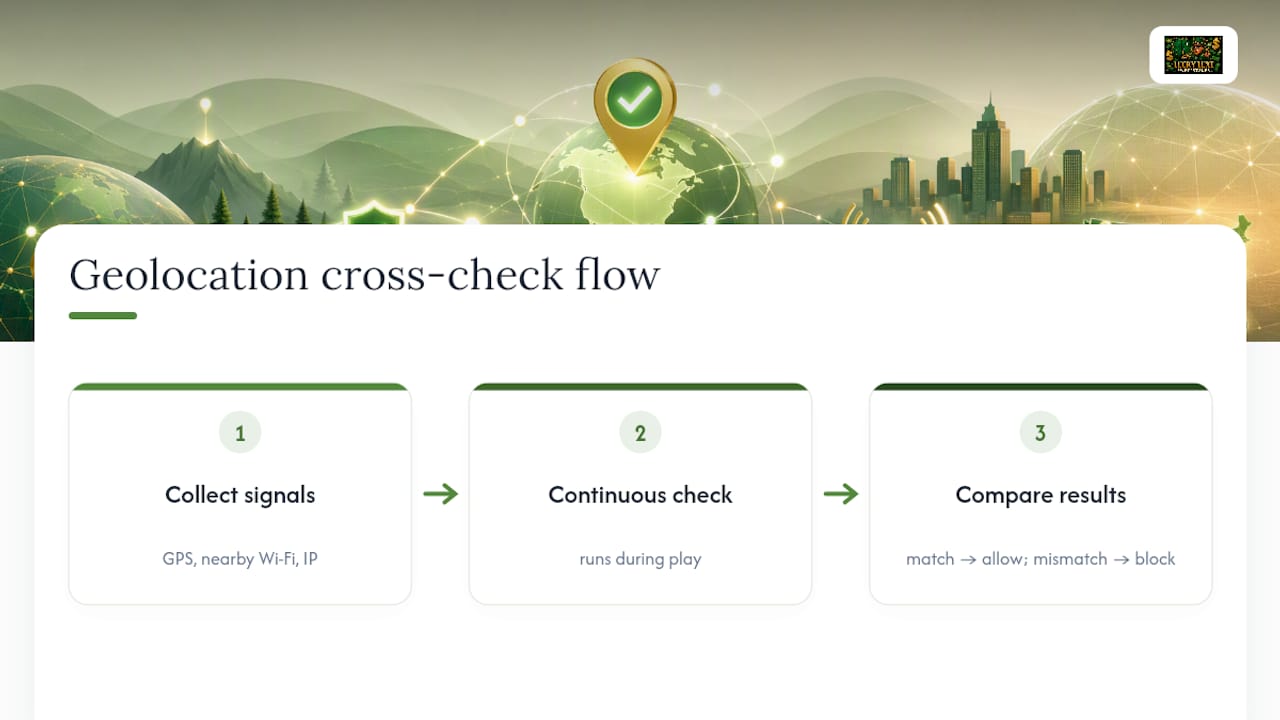
The "geolocation not working" message almost always means one of those signals contradicts another. Your IP address might say Nevada while your GPS says Ohio, or your device might be refusing to share location data at all. The system errs on the side of caution and blocks access rather than guessing.
Three things typically cause this standoff: your browser or app doesn't have location permission turned on, your network is masking or altering your real location, or your device's own location service has stalled. The next two sections walk through fixes for each.
Quick Fixes to Try First
Before digging into settings menus, run through this five-minute checklist. Most geolocation errors clear up with one of these steps.
- Turn off any VPN, proxy, or privacy-focused DNS service (like a "secure DNS" browser extension) and reload the page.
- Close and fully restart your browser or the Lucky Luxe app, then try logging in again.
- Reset the site's location permission to "Allow" in your browser settings (usually under site permissions or privacy settings).
- Switch from home Wi-Fi to mobile data, or vice versa, since ISP routing quirks sometimes misreport your region.
- Open Lucky Luxe in an incognito or private browsing window to rule out a browser extension interfering with location sharing.
- Take a screenshot of the exact error message along with the time it happened, in case you need to contact support afterward.
Pro Tip: Ad blockers and privacy extensions are the most overlooked cause of location errors. Try disabling them one at a time rather than all at once. That way you find the actual culprit instead of just guessing which one was the problem.
Run through this list in order. Skipping straight to network changes without checking permissions first usually just means retracing your steps later.
Device and Browser Steps That Actually Work
If the quick fixes didn't clear the error, the problem is likely deeper in your device's settings or the way your browser handles location requests. Work through these in sequence rather than jumping around.
- Try the native app instead of a browser, if one is available. Native apps use hardware-level location attestation, tools like Apple's App Attest or Google's Play Integrity, that verify your device's GPS directly rather than relying on a browser's location API. Peabody Compliance notes that this handoff approach catches location data browsers sometimes miss entirely.
- Turn on system-level location services. On iPhone, go to Settings, then Privacy & Security, then Location Services, and make sure it's on. On Android, go to Settings, then Location, and toggle it on. Then confirm your browser or the Lucky Luxe app has permission within those settings, since the system toggle and the app-level permission are two separate switches.
- Reset site permissions on desktop. In Chrome, Edge, or Firefox, click the lock icon in the address bar, open site settings, and set Location to "Allow." Restart the browser completely (not just the tab) and reload Lucky Luxe.
- Check Windows' Location service directly. If you're on a PC, Windows' own Location service can get stuck. Sweeps Farming's troubleshooting guide walks through resetting cached location data and restarting the Geolocation Service when this happens, and our own platform navigation guide covers related permission checks.
- Confirm your reported location before going back to Lucky Luxe. Use any basic browser-based location test site to see what coordinates your device is actually broadcasting. If that test shows the wrong state or no data at all, the problem is on your device, not on Lucky Luxe's end.
Multi-signal verification exists precisely because single-point checks fail often enough to matter. That's the whole reason this troubleshooting sequence has five steps instead of one.
How VPNs and Network Setups Break Location Checks
Geolocation systems weigh three signals against each other: your IP address (which network you're connecting through), GPS (your device's actual physical coordinates), and Wi-Fi triangulation (nearby wireless networks with known locations). When these three don't agree, the system flags a mismatch and blocks play rather than picking one signal to trust.
A handful of network setups trigger this mismatch constantly:
- VPNs and proxy services, which route your IP through a server in a completely different state or country.
- Corporate networks, which sometimes route traffic through a headquarters location in another state.
- Public Wi-Fi at airports, hotels, or coffee shops, which can report an IP tied to the network provider's regional hub.
- Mobile hotspots that occasionally route through a carrier's tower in a neighboring state near a border.
Locance's compliance research describes modern detection systems that specifically flag VPN and proxy traffic, along with device fingerprinting and behavioral analytics designed to catch spoofed locations. This isn't a simple check to trick. Attempting to mask your location with a VPN might get you past the initial screen, but it creates a much bigger problem down the line.
Pro Tip: If you're consistently flagged and you haven't touched a VPN, call your internet provider. Some ISPs route rural or border-area customers through data centers registered in a neighboring state, which trips these checks even when you're playing from home.
The safer path is straightforward: use your trusted home ISP or switch to cellular data if your home network keeps failing. Both give Lucky Luxe a cleaner, unmasked signal to verify.
What "Restricted States" Means for U.S. Players
Sweepstakes gaming operates under different rules in every state, and geolocation verification exists to enforce those state lines in real time. It's not a technical formality. It's the mechanism that keeps a platform's prize redemption and payment processing legally sound.
A few things worth understanding here:
- Geolocation checks confirm not just that you can play, but that you're eligible to redeem prizes and receive payments under your state's specific rules.
- Industry coverage has noted that states including Washington, Montana, and New York have introduced restrictions or bills limiting sweepstakes-style gaming, according to Locance's regulatory analysis, pushing platforms toward stricter state-by-state enforcement.
- If you're physically located in a state where sweepstakes play is restricted, no permission reset or network switch will change that outcome. The block is intentional and tied to the law, not a bug.
- Before spending time troubleshooting, it's worth confirming your current state allows sweepstakes-style play in the first place.
Regulators increasingly expect layered, multi-signal verification rather than a simple IP lookup, which is part of why these checks feel stricter than they once did.
What to Send Lucky Luxe Support
If you've worked through the device and network fixes and you're still blocked, contact support with a complete picture up front. This saves multiple back-and-forth emails.
- Your account email or username, so support can pull up your account directly.
- The approximate time of the error, including your time zone, so support can match it against system logs.
- A clear screenshot of the exact error message you received.
- Your device type, operating system and version, and browser or app version.
- Whether you were using a VPN, mobile data, or a specific type of network (home ISP, corporate, public Wi-Fi) when the error occurred.
- If possible, your public IP address from any IP lookup site, along with the network type.
Support teams move faster with concrete details than with a description alone. For related account and privacy questions, our data security guide explains how verification data is handled behind the scenes.
Lucky Luxe's Take on Fair Play and Access
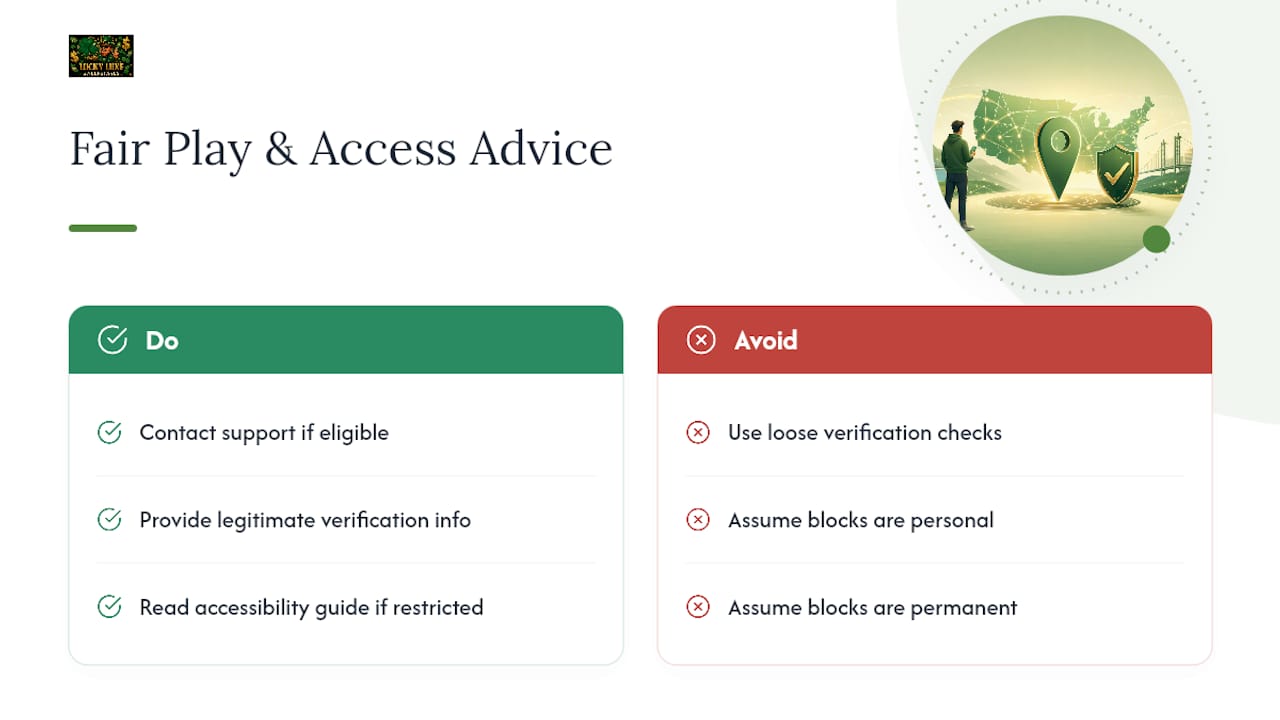
We built our verification process to be strict for a reason: it protects every player's ability to redeem prizes fairly and keeps payment processing compliant with each state's rules. A loose check might feel more convenient in the moment, but it puts real winnings at risk down the line.
When access gets blocked, it's rarely personal and rarely permanent unless state law is the actual barrier. If you're in an eligible state and still stuck, our support team works through legitimate cases quickly. And if you're in a restricted state, our accessibility guide covers other ways to stay entertained on the platform.
— Skyline
Back Into Lucky Luxe? Here's Where to Go First
The platform's edge isn't just the game selection, but also the convenience of having promotions, referral rewards, and support accessible from a single dashboard instead of across separate pages. Once your geolocation check clears, head straight to the Lucky Luxe home page to see current promotional offers and check your referral program status.
Before trying to cash out any Sweeps Coins, take a minute to review your account details and confirm they match your actual location and identity. Mismatches here are one of the most common reasons redemptions stall even after access is restored. If you're new to the platform's layout, our gaming site features guide points out settings worth checking on your first visit back. Head to Luckyluxe now to pick up where you left off.
Sources
- Geolocation Verification - Sweepstakes Glossary | SweepState
- Sweepstakes Geolocation Compliance: State-by-State Guide | Peabody Compliance
- Sweepstakes Geolocation Compliance: Regulation, Risk, and Opportunity
- Sweeps Site Location Not Working? How to Fix It | Sweeps Farming
- PSA: Do Not Bypass Geolocation Verification on Sweeps Sites - SlotsFan
FAQ
Why does Lucky Luxe say my location can't be verified?
The site's geolocation system detected a mismatch between your IP address, GPS data, or Wi-Fi signal, so it can't confirm which state you're playing from and blocks access as a precaution.
Can I use a VPN to get around a geolocation error?
No. VPNs can trigger detection systems and, even when they don't, attempting to bypass geolocation checks puts prize redemption and identity verification at risk later.
Why does the error happen even at home on a trusted network?
Some ISPs route traffic through data centers registered in a different state, which can trip location checks even without a VPN. Contacting your provider or switching to mobile data usually resolves this.
Does Lucky Luxe cost anything to play?
Lucky Luxe offers free daily play options alongside Gold Coin packages for purchase; current pricing and package details are listed directly on the Lucky Luxe website.
What if I'm in a state where sweepstakes gaming is restricted?
No device or network fix will restore access if your state restricts sweepstakes-style play, since the block reflects state law rather than a technical error.