

Contacting customer support on a gaming platform means submitting a detailed request through official channels like help centers, ticket systems, live chat, or in-game support tools. Platforms like Epic Games, Steam, and Xbox have moved away from phone support entirely. They rely on structured ticketing to track issues at scale. AI now resolves over 70% of routine player issues instantly, which means your request may get answered before a human agent ever reads it. Knowing how the system works puts you ahead of most players who waste time searching for a phone number that does not exist.
How to contact customer support on a gaming platform
Before you do anything else, understand that the gaming help desk model in 2026 is built around self-service and ticket submission. Most gaming platforms do not offer phone support. Expecting a phone number delays your resolution and sends you down a dead end. The standard path is the official support portal, a logged-in ticket form, and a response window measured in hours, not minutes.
The support structure at major platforms breaks down into five main channels. Each one serves a different type of problem and urgency level. Knowing which channel fits your issue is the first decision that determines how fast you get help.
For a broader look at how platforms have shifted toward omnichannel support experiences, the shift reflects a real change in how gaming companies think about player retention.
What do you need before submitting a support request?
Walking into a support ticket without the right information is the single biggest reason resolutions take longer than they should. Providing screenshots, error codes, and your account ID upfront cuts the back-and-forth and speeds up the entire process.
Gather these details before you open any form:
- Game title and platform (PC, console, mobile)
- Your account ID or username tied to the platform
- Error codes displayed on screen during the issue
- Screenshots or screen recordings of the problem
- Transaction ID or purchase confirmation for billing issues
- Date and time the issue occurred
- Steps you already tried to fix it yourself
Logging into your account before submitting also matters. Most platforms use your login to pull your game library, purchase history, and account flags automatically. A logged-in ticket gets routed faster than an anonymous one because the system already knows who you are and what you own.
Pro Tip: Write a one-paragraph summary of your issue before you open the ticket form. Paste it in when prompted. This forces you to organize your thoughts and include every relevant detail without forgetting something mid-form.
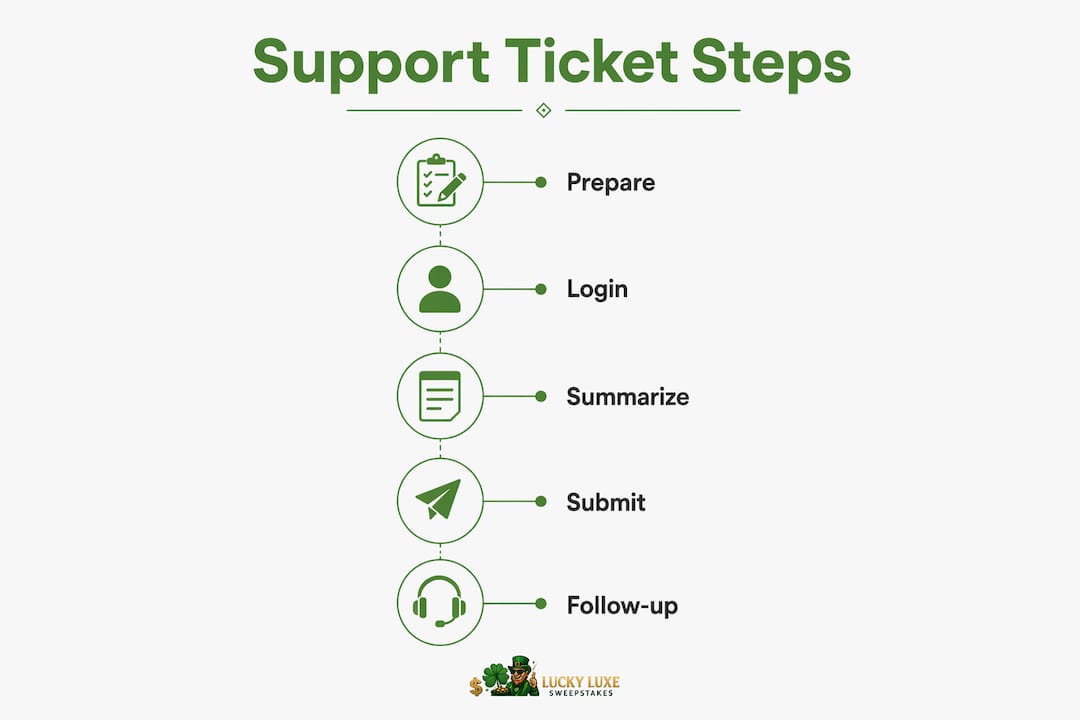
Step-by-step: how to submit a gaming support ticket
The process is consistent across most major platforms. Following it in order prevents the most common mistakes, like submitting to the wrong category or leaving out account details.
- Go to the official support site. Search "[Platform name] support" and click the official domain. Avoid third-party sites that mimic support portals.
- Select your game or product. Most platforms like Epic Games and Xbox organize their help center by title or product category. Choosing the wrong one routes your ticket to the wrong team.
- Choose your issue type. Categories typically include billing, account access, technical issues, and gameplay bugs. Pick the closest match.
- Log in to your account. This step is required on most platforms. Logging in enables a personalized ticket form that pre-fills your account data.
- Fill in the issue description. Be specific. Include error codes, what you were doing when the issue happened, and what you have already tried.
- Attach evidence. Upload screenshots, video clips, or transaction records directly in the form.
- Submit and record your ticket number. Save this number. You will need it to follow up or check status.
- Check for live chat or in-game support. Some platforms offer these options after you log in. Use them if your issue is urgent.
Here is a quick reference for what to expect after submission:
| Platform Type | Typical First Response | Live Chat Available |
|---|---|---|
| Large platform (Steam, Xbox) | Under 24 hours | Sometimes |
| Mid-size publisher | 24–48 hours | Rarely |
| Small indie publisher | 48–72 hours | No |
| In-game support tools | Instant to 1 hour | Yes |
Response times within 48 hours are standard for most publishers. Larger platforms with more resources often respond faster, especially for billing issues.
What are the main support channels and how do they compare?
Every major gaming platform offers more than one way to reach their team. The right channel depends on your issue type, urgency, and whether your account has any special status.

Ticket systems are the backbone of customer service gaming. They are structured, trackable, and create a written record of every exchange. The downside is that initial responses are not instant. You submit, wait, and reply in sequence.
Live chat is faster and interactive. Live chat and in-game support provide immediate help without forcing you to leave your session. The limitation is availability. Many platforms restrict live chat to business hours or to specific issue types.
In-game support is the most convenient option when it exists. Modern platforms aim to keep players immersed by embedding support directly inside the game client. You report an issue without alt-tabbing or opening a browser. This channel works best for gameplay bugs, matchmaking problems, and in-session issues.
Social media is useful for one specific purpose: checking whether a known outage or bug is already being addressed. Platforms like Xbox and Steam post status updates on their official accounts. Checking official status pages before submitting a ticket prevents you from filing a duplicate request during a widespread outage.
Phone support is nearly nonexistent in gaming. The industry moved away from it because ticket systems handle volume better and create a searchable history. Do not spend time looking for a phone number on major platforms. It will not be there.
| Channel | Speed | Privacy | Best For |
|---|---|---|---|
| Ticket system | Slow to medium | High | Billing, account issues |
| Live chat | Fast | Medium | Quick technical questions |
| In-game support | Fast | Medium | Gameplay bugs, session issues |
| Social media | Variable | Low | Outage checks only |
| Phone | N/A | High | Not available on most platforms |
Tips to get the best response from gaming platform support
Most players make the same mistakes when reaching out for gaming platform assistance. Avoiding them cuts your resolution time significantly.
- Check the status page first. Before filing anything, visit the platform's official status page or social media. If the servers are down, your ticket will sit in a queue until the issue resolves anyway.
- Never search for a phone number. Gaming platforms rely on ticket-based systems rather than phone lines. Third-party sites that list "support numbers" are often scams.
- Submit once, not multiple times. Duplicate tickets slow down the queue for everyone and can push your original request further back.
- Be patient during launch windows. Support agents face high volume during game launches, and response times stretch during those periods. Submitting during off-peak hours gets faster attention.
- Understand what AI handles versus humans. Routine issues like password resets, basic billing questions, and account unlocks are resolved by AI instantly. Complex disputes, ban appeals, and fraud cases go to human agents. Balancing AI speed with human empathy for complex cases is how platforms maintain player satisfaction.
If you are a high-spend player, check whether your platform offers a VIP or priority support lane. VIP players often receive dedicated support with faster response times and account managers who handle escalations directly.
Pro Tip: If your issue involves account security, like a compromised login or unauthorized purchase, flag it explicitly in the subject line. Security-related tickets are typically escalated above standard queue priority.
For issues tied to account access specifically, understanding how single sign-on works can help you recover access faster before support even responds.
Key takeaways
The fastest path to resolution is a detailed, logged-in ticket submitted through the official support portal with screenshots, error codes, and account information included from the start.
| Point | Details |
|---|---|
| Prepare before you submit | Gather your account ID, error codes, and screenshots before opening any support form. |
| Phone support does not exist | Major gaming platforms use ticket systems, not phone lines. Do not search for a number. |
| Match channel to issue type | Use in-game support for session bugs, tickets for billing, and social media only for outage checks. |
| AI handles routine requests | Password resets and basic billing questions resolve instantly through AI without a wait. |
| VIP players get faster service | High-spend accounts on most platforms have access to priority lanes and dedicated agents. |
What i have learned after years of watching gamers fight support systems
The biggest frustration I see is not slow response times. It is players arriving at the support portal completely unprepared, submitting vague tickets, and then blaming the platform when nothing gets resolved quickly. The system is not broken. The approach is.
Most gamers treat support like a complaint hotline. They expect someone to pick up, hear their frustration, and fix it immediately. That is not how any major platform operates in 2026. The system is built for volume and documentation. When you work with that structure instead of against it, your experience changes completely.
The other thing I have noticed is that players underestimate in-game support. It is genuinely the best channel for real-time issues. You do not lose your session, you do not have to describe your setup from scratch, and the system already knows your game state. Platforms that have invested in this channel, like those using Helpshift's in-app tools, resolve issues faster and with higher satisfaction scores. If your platform offers it, use it first.
The AI question also trips people up. Players get frustrated when they realize they are talking to a bot. My honest read: for routine issues, the bot is faster and more accurate than a human agent reading a queue at 2 a.m. Accept it for what it is. If your issue is genuinely complex, say so clearly in your ticket and request escalation. Most platforms will move you up if you ask directly.
— Skyline
Explore Luckyluxe for gaming and support resources
Luckyluxe is built for players who want more than just games. The platform offers slots, fishing games, and arcade titles with a clean interface and fair play standards that hold up under scrutiny.
Beyond the game library, Luckyluxe provides support resources and a referral program designed to keep your experience running without friction. If you have ever dealt with a clunky platform that made getting help feel like a second job, Luckyluxe is worth a look. Visit Luckyluxe to explore current promotions, featured titles, and the support tools available to every player on the platform.
FAQ
What is the fastest way to reach gaming support?
Live chat and in-game support tools are the fastest channels. For platforms without those options, a detailed ticket submitted through the official help center is the next best path.
Why can't i find a phone number for gaming support?
Modern gaming platforms use ticket systems instead of phone lines because tickets handle high volume and create a trackable history. Phone support is not available on most major platforms.
How long does a gaming support ticket take?
Most publishers respond within 48 hours. Large platforms like Steam and Xbox often respond faster, especially for billing or account access issues.
What information should i include in my support ticket?
Include your account ID, game title, platform, error codes, screenshots, and a clear description of the issue. Detailed upfront information reduces back-and-forth and speeds up resolution.
Do VIP players get faster support?
Yes. High-spend players receive dedicated support lanes on most major platforms, including priority queues and account managers for complex issues.