

Five features determine whether your Luckyluxe referral earns you bonuses or disappears into the void: a shareable link or promo code tied to your account, an in-app share tool that keeps your referrer ID intact, a clear reward trigger (what your friend must actually do), a dashboard where you can watch status update in real time, and anti-abuse controls that protect the program's fairness. Miss any one of them and your referral may not credit. Get all five right and you earn in-game bonuses or sweepstakes entries every time a friend joins through your link.
- Shareable link/code — carries your unique referrer ID so the platform knows who sent the recruit
- In-app share modal — the safest way to distribute your link without accidentally stripping tracking parameters
- Reward triggers — the specific actions (registration, first purchase, qualifying play) that unlock your bonus
- Referral-status dashboard — shows clicks, pending referrals, and credited rewards in one place
- Anti-abuse controls — non-guessable IDs, self-referral blocks, and expiration windows that keep the program honest
Industry examples show reward fulfillment can take up to 24 hours after a qualifying action is verified. Plan around that window instead of expecting an instant credit.
Key Takeaways
The five referral-tracking features that matter on Luckyluxe are a unique referrer link or code, an in-app share modal, defined reward triggers, a live status dashboard, and anti-abuse controls that protect every player's earnings.
| Point | Details |
|---|---|
| Use the in-app share modal | It preserves your referrer ID most reliably; other channels work but carry more risk of parameter loss. |
| Reward triggers are specific | Registration alone may not be enough; confirm whether a first purchase or play milestone is required. |
| Verification takes up to 24 hours | Allow the full window before concluding a referral failed or contacting support. |
| Check your Referrals tab | Your dashboard shows every status from Clicked to Credited; embedded dashboards increase how often players check and share. |
| Luckyluxe's anti-abuse rules protect you | Non-guessable IDs, self-referral blocks, and expiration windows keep the reward pool fair for honest referrers. |
Table of Contents
- What are the referral tracking features worth knowing on Luckyluxe?
- How do you share your Luckyluxe invite without losing referral credit?
- Which actions actually trigger your Luckyluxe referral reward?
- Where do you check your referral status inside Luckyluxe?
- How does Luckyluxe prevent referral abuse and what edge cases should you know?
- What are the best ways to earn more referral rewards on Luckyluxe?
- What should you do if a referral didn't credit?
- Why player-friendly referral tools matter to us at Luckyluxe
- Your Luckyluxe referral tools are ready to use right now
- Sources
What are the referral tracking features worth knowing on Luckyluxe?
Your referral link is not just a URL. It carries two critical pieces of data: a referrer ID that identifies your account and an optional custom ID tied to a specific promotion. When a friend clicks your link, the platform reads both fields, logs the click, and waits for the qualifying action before crediting anyone.
The mechanics mirror what developer documentation describes for platforms like Discord, where a shareLink flow passes a custom_id and referrer_id to the activity. The docs specifically recommend generating non-guessable custom IDs and validating incoming referral data on the server side. Luckyluxe follows the same logic: your link's parameters are validated, not just trusted.
What players typically see on Luckyluxe:
- A copy-to-clipboard link generated in your account menu
- An optional promo code your friend can enter manually if the link doesn't work
- A link expiration window (links are often ephemeral; Discord's TTL example is 30 days)
- A self-referral block that prevents you from using your own code
Pro Tip: Before you send anything, open your own link in a private browser tab and confirm it loads the Luckyluxe sign-up page with your referral parameters visible in the URL. If the page loads clean with no tracking string, the link is broken.
For a deeper look at how referral links function across gaming platforms, the Luckyluxe blog covers the role of referral links on online platforms in detail.
How do you share your Luckyluxe invite without losing referral credit?
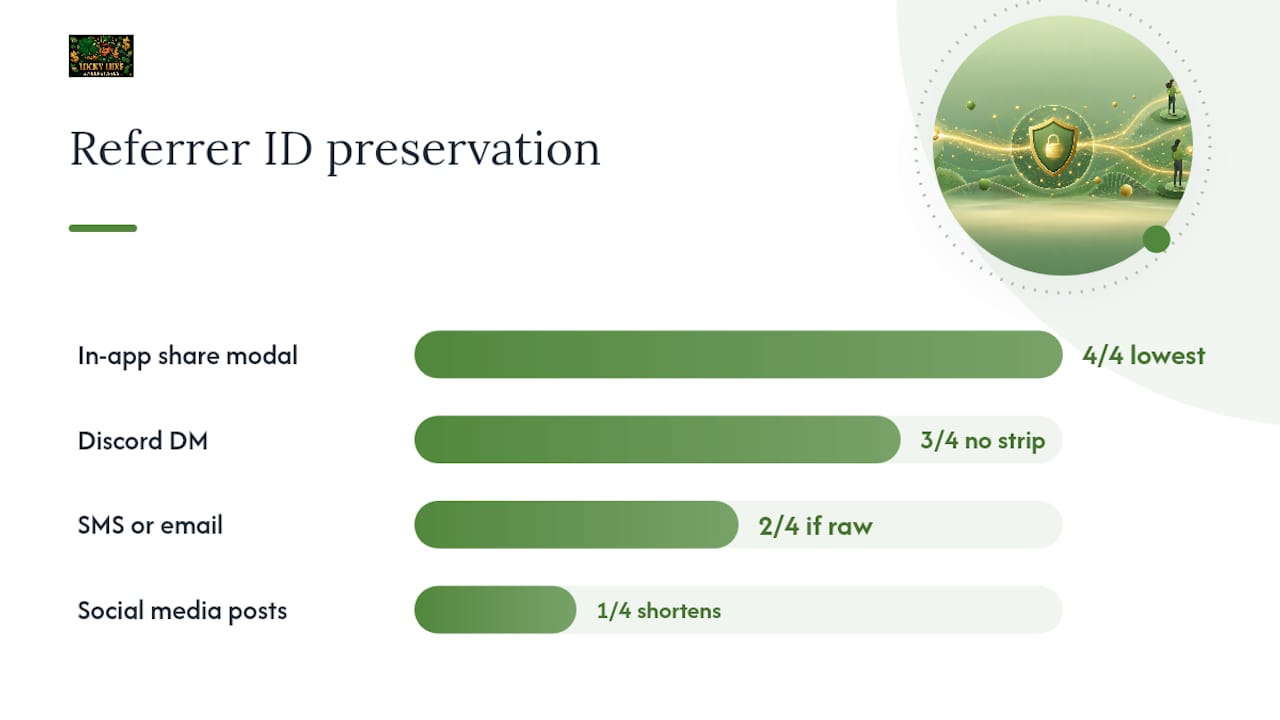
Use the in-app share modal first. Every other method works, but none of them guarantee that your referrer ID survives the trip to your friend's screen the way the native share flow does.
Priority order for sharing:
- In-app share modal — preserves custom_id and referrer_id by design; lowest risk of parameter loss
- Discord direct message — paste the full link; Discord's link preview doesn't strip query strings
- SMS or email — reliable as long as you paste the raw link, not a manually typed version
- Social media posts — works, but some platforms auto-shorten URLs; always test the shortened version before posting widely
The referral marketing guide for gaming notes that multichannel communication improves conversion, so spreading across two or three channels beats relying on one. The catch: every channel you add is another place a parameter can get stripped.
Pro Tip: If you shorten your link with a tool like Bitly, click the shortened URL yourself first and confirm the destination URL still contains your referrer ID. Some URL shorteners drop query parameters by default unless you configure them to pass through.
A message that converts tends to be personal and specific. Two templates worth trying:
- "I've been playing Luckyluxe and thought you'd enjoy it. Sign up through my link and we both get a bonus: [your link]"
- "Trying to hit my referral milestone on Luckyluxe — use my code [CODE] when you register and you'll get a welcome bonus too."
For more proven sharing tactics, the Luckyluxe blog's guide on how to share referral links on a gaming platform walks through each channel step by step.
Which actions actually trigger your Luckyluxe referral reward?
Clicking your link is not enough. The platform requires a qualifying action before either of you sees a reward.
Common trigger events, roughly in the order they occur:
- Registration — friend creates a verified account using your link or code
- First qualifying play — friend reaches a defined play milestone (varies by promotion)
- First purchase — friend buys a Gold Coin package
- Milestone completion — friend hits a cumulative threshold (tiered programs may stack rewards)
Registration and first purchase are typically one-time triggers per recruit. Milestone completions can repeat if the program is tiered.
As documented in EVE Online's Recruit a Friend program, per-recruit rewards are capped and fulfillment takes up to 24 hours after the qualifying action is verified. Luckyluxe operates on similar logic: verification happens first, then delivery.
Typical flow from click to credit:
- Friend clicks your link
- Platform logs the referrer ID and custom ID
- Friend registers and completes the qualifying action
- Platform runs verification (fraud checks, self-referral check, expiration check)
- Reward delivered to both accounts, usually within 24 hours
Dual-sided rewards (both you and your friend receive something) are common in gaming referral programs. Check your current promotion's terms for any cap on total recruits or maximum reward per referral cycle.
For details on when rewards become spendable, the referral withdrawal conditions guide explains payout timelines clearly.
Where do you check your referral status inside Luckyluxe?
Go to your account menu and open the Referrals tab. That's where you'll find a live view of every referral you've sent, what stage each one is at, and what has already credited.
Status labels you'll typically see:
- Clicked/Tracked — friend opened your link; no qualifying action yet
- Registered — friend created an account
- Qualifying action complete — friend hit the required trigger
- Pending verification — platform is running its checks
- Credited — reward has been added to your balance
Notifications arrive via in-app banner, email, or a balance change you'll notice the next time you log in. The embedded referral dashboard model, which Luckyluxe follows by keeping the Referrals tab inside the main navigation, means you'll see your referral stats during normal play rather than having to visit a separate portal.
If a status stalls at "Pending verification" past the expected window:
- Confirm your friend completed the qualifying action (ask them directly)
- Check whether the link had expired before they clicked
- Verify no self-referral flag was triggered
- Wait the full 24-hour verification window before escalating
How does Luckyluxe prevent referral abuse and what edge cases should you know?
The platform uses several overlapping safeguards. Non-guessable custom IDs mean nobody can reverse-engineer your link or fabricate a fake referral. Self-referral checks compare the referrer ID against the new account's device fingerprint and login data. Expiration windows invalidate links after a set period. Fraud-detection heuristics flag suspicious patterns like multiple accounts from one device.
Rules players should keep in mind:
- One reward per recruit — the same friend can only trigger your referral bonus once
- Verification before reward — no credit is issued until checks pass
- Link expiration — using an expired link means the referral won't attribute, even if your friend registers
- Cooldowns — some promotions limit how frequently you can generate new links
- Suspicious behavior — mass sign-ups from one IP or device will be flagged and rewards withheld
Edge cases worth knowing: if your friend signs up on a new device after clearing cookies, the platform may not connect their registration to your original link click. If they already have a Luckyluxe account, they likely won't qualify as a new recruit regardless of which link they use.
Luckyluxe's approach to verification is covered in detail in the referral signup verification guide, which explains how platforms cross-check device data, account history, and link parameters.
Pro Tip: Tell your friend to click your link, open the registration page immediately, and complete sign-up in that same session without switching browsers or devices. That single-session path gives the platform the cleanest attribution signal.
What are the best ways to earn more referral rewards on Luckyluxe?
Quality beats volume. Five friends who actually register and play are worth more than fifty who click and bounce.
Tactics that raise your conversion rate:
- Use the in-app share modal — it's the most reliable path to a tracked referral
- Personalize the message — explain what you enjoy about Luckyluxe; generic "sign up here" messages convert poorly
- Share during high-engagement windows — evenings and weekends tend to produce more sign-ups than weekday mornings
- Follow up once — a single polite reminder 48 hours after your first message is fine; more than that crosses into spam
- Show the benefit to them — dual-sided rewards mean your friend gains something too; lead with that
Progress-tracking visuals like milestones and progress bars make referrals feel like part of the game itself, which raises repeat participation according to referral marketing research in gaming. Check your Referrals tab regularly; seeing your progress toward the next reward tier is a natural motivator to share again.
Leaderboard features, where available, shift referral sharing from a one-time action into ongoing competition. Research on referral leaderboards shows they increase referrals per referrer and repeat sharing, though programs should watch for top-heavy concentration that discourages mid-tier players.
For a full breakdown of tactics, the best practices for sharing referral links guide on the Luckyluxe blog is worth bookmarking.
What should you do if a referral didn't credit?
Run this checklist before filing a support ticket:
- Confirm the exact link or code used — ask your friend to send you the URL they clicked or the code they entered
- Check your dashboard — look for the referral under any status, including "Pending verification"
- Confirm the qualifying action — verify your friend completed the required step (registration, first purchase, or play milestone)
- Check for self-referral — confirm the account is genuinely new and not linked to your own device or email
- Check link expiration — if the link was generated weeks ago, it may have expired before your friend clicked
- Wait the full verification window — allow up to 24 hours from the qualifying action before concluding something went wrong
- Contact support — if the status hasn't updated after 24 hours, reach out with: your referrer username, the referral link or code, your friend's username, and the timestamp of their qualifying action
A support message template: "Hi, I referred [friend's username] using link [URL] or code [CODE] on [date/time]. They completed [qualifying action] on [date/time] but my referral dashboard still shows [current status]. Could you investigate? My username is [your username]."
Why player-friendly referral tools matter to us at Luckyluxe
At Luckyluxe, we built the referral program around one principle: players should never have to guess whether their invite worked. That means transparent status labels in your dashboard, clear reward triggers you can read before you share, and verification that runs quietly in the background without holding up your reward longer than necessary. Anti-abuse controls exist to protect every player in the program, not to create friction for honest referrers. When the system catches a fraudulent sign-up, it keeps the reward pool fair for everyone who played by the rules. We're committed to delivering rewards promptly and communicating clearly when something needs a second look.
Your Luckyluxe referral tools are ready to use right now
Head to your Luckyluxe account menu and open the Refer a Friend or Referrals tab. Your unique link and promo code are there, ready to copy and share. The tab also shows your current referral stats, pending rewards, and any active promotion details so you know exactly what your friend needs to do to unlock your bonus.
If you're new to the program or want a step-by-step walkthrough, the Luckyluxe referral guide covers everything from generating your first link to checking your reward balance. Start with one invite to someone you know will enjoy the games, confirm the referral tracks in your dashboard, and build from there.
Sources
These are the primary references behind this guide, organized by what each one covers:
- Discord: Activities development guide — Growth and referrals
- A 10-Step Guide to Referral Marketing in the Gaming Industry - WebEngage
- Embed an Affiliate Dashboard in Your SaaS App — Refgrow
- Referral Leaderboards: Gamifying Your Referral Program — Tolinku
- Recruit a Friend — EVE Online support